The problem we will solve
You are preparing a delivery with a coding assistant when the provider reports a usage limit. You have another account or API available, but now you need to change settings, find an accessible model and check that your tool still works.
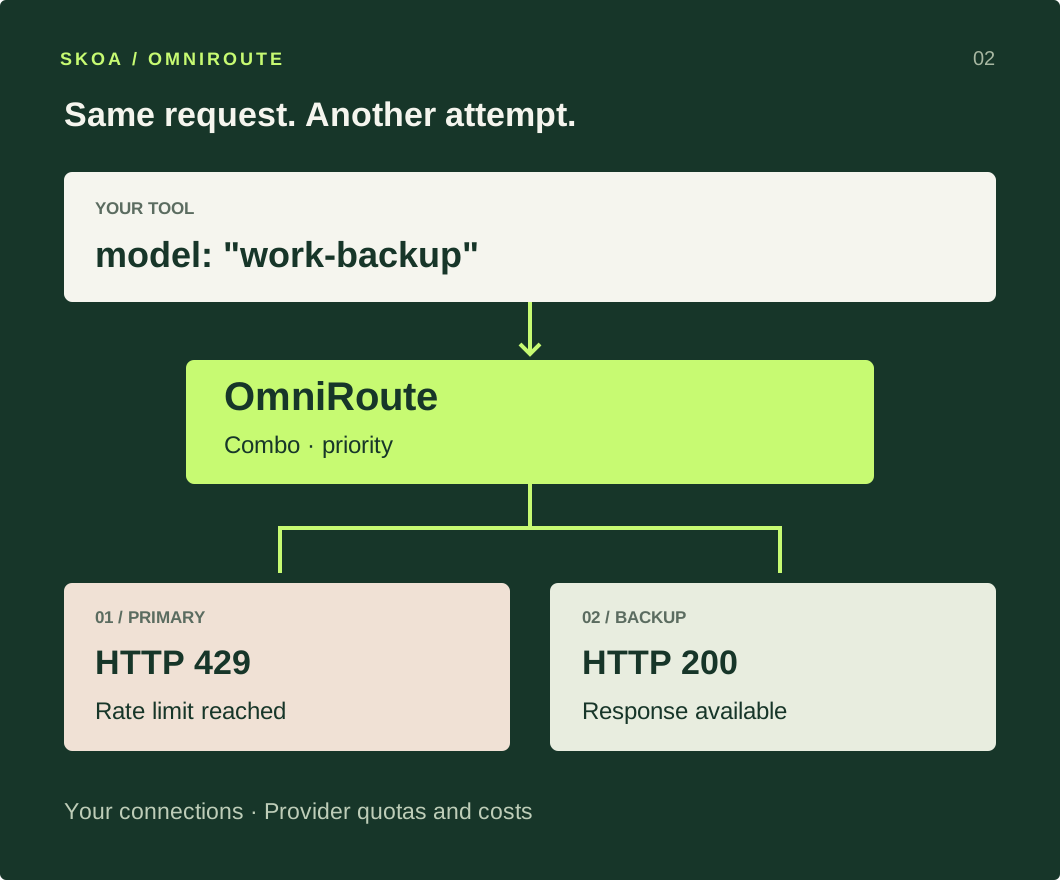
The goal of this guide: your tool always requests work-backup. OmniRoute tries your primary model and can use a backup when a retryable failure occurs. You change the order in one dashboard, without reconfiguring every application.
OmniRoute is an open-source program you run on your computer or server. It receives requests from compatible tools, selects a connection and translates supported formats. The AI still runs at the provider you choose, unless you connect a local model.
| When this happens… | How OmniRoute can help |
|---|---|
| A provider returns 429 or stops responding. | A combo groups backup models and controls the order of attempts. |
| You keep updating keys and models across several tools. | One endpoint and a stable alias centralize those settings. |
| You have several authorized connections and cannot track their limits. | Manage accounts, priorities and cooldowns; inspect quotas where providers expose them. |
| You use an expensive model for simple tasks. | Separate a low-cost combo from a demanding-task combo, or explore cost- and latency-based selection. |
| You cannot tell which model answered or where usage went. | Logs and analytics help inspect providers, errors, usage and estimated costs. |
| You already run a local model alongside cloud services. | Bring them together through compatible connections, while checking capabilities and where your data goes. |
Documented capabilities: Combos and model selection ↗ · Usage, quotas and costs ↗.
A GOOD FIT IF…
You have another option.
You want control over the account or model your tool uses, with a backup already prepared.
YOU CAN SKIP THIS IF…
Your current connection is enough.
If you only use a web chat, or your tool already handles provider switching, another service adds maintenance.
Quotas and model fallback
Yes: switching to another model when a quota runs out is a central use case. You need another valid connection with available capacity, configured to accept the request.
A fallback is another attempt using an alternative. In a priority combo, OmniRoute tries the first eligible candidate; after a recoverable error such as a 429, it can advance to the next. It can also temporarily skip a connection it knows is rate-limited.
| “I ran out of tokens” might mean… | What a backup changes |
|---|---|
A temporary request or token rate limit: 429. | A connection with an independent quota can serve requests while the first limit resets. |
| An exhausted subscription allowance or API balance. | You need available access elsewhere. The router does not refill a balance or upgrade a plan. |
| The conversation exceeds the context window. | Switching will not help if the next model cannot fit it either. Reduce context or choose a suitable model. |
| The response reached its output limit. | This is a generation limit. Check the output setting or continue the task; it is not necessarily a failure that triggers fallback. |
Different keys do not always mean independent quotas: two keys in one project may share a limit. An Internet outage can affect all your remote providers. Choose a backup that addresses the failure you actually face.
The request can take longer. The backup may answer differently or cost more, and must support the context, tools and formats your application uses. Do not assume it can resume an already-started response in the middle of a sentence.
The router forwards the information your tool includes in the request; it does not import your ChatGPT or Claude web chat history automatically. Choosing a backup also chooses another possible recipient of your messages.
OmniRoute or OpenRouter
These are different projects with similar names. Both can provide one entry point to several models. OpenRouter also supports fallback, between providers for a model and between configured models.
| Decision | OmniRoute | OpenRouter |
|---|---|---|
| Where it runs | You run and maintain it locally or on your server. | A hosted service you call over an API. |
| How you get access | Connect your providers: keys, compatible connectors and local services. | Use its catalog with credits, or your own keys on supported BYOK routes. |
| Backup plan | Configure combos and policies across your connections. | Configure provider preferences and a model fallback list. |
| When it fits | You want to combine your own connections and control routing. | You want a hosted API and a shared catalog without maintaining this gateway. |
You can also connect OpenRouter as an OmniRoute provider. That can be useful as one of several alternatives; if OpenRouter alone meets your needs, you may not need both. This is an architectural choice, not a feature-count contest.
OpenRouter: model fallback ↗ · Provider selection ↗ · Bring your own keys ↗.
Can I use subscriptions?
OmniRoute includes connectors for some subscriptions. That does not make every plan usable in every application. Separate the technical connector, your account’s access and the uses permitted by the provider.
ChatGPT: access through the Codex connector
OmniRoute offers OpenAI Codex with OAuth sign-in. OpenAI documents ChatGPT-based Codex access and, separately, API key access. OmniRoute’s connector depends on that integration: your account needs access and quota, and compatibility can change. It does not turn every model or feature of the web chat into an API.
With OpenAI → API Key, usage is billed through OpenAI Platform instead of the credits included in your ChatGPT plan. Official Codex authentication ↗.
Claude: a technical connector is not universal permission
OmniRoute also includes a Claude Code OAuth connector. Anthropic reserves subscription credentials for ordinary use of its applications and does not permit third-party developers to route requests through Free, Pro or Max plans on behalf of their users. For an application integration, this guide uses Anthropic → API Key, with separate billing.
Using your subscription in unmodified Claude Code is different from turning it into the backend of a visitor-facing chatbot. Check the conditions for your use case; do not copy browser cookies or tokens. Anthropic authentication and credentials ↗.
Two connections you are authorized to use, both able to answer. The most direct GPT + Claude route is an API key from each provider. You can also use an available Codex connection with an independent backup, or an already-configured local model. OmniRoute does not supply those accounts or pay for their usage.
Install and open
Install Node.js 24 LTS ↗ if you do not have it. Open Terminal on macOS/Linux or PowerShell on Windows. These commands should print version numbers:
node --version
npm --version
This guide pins OmniRoute 3.8.50. Its package supports Node 22.22.2 or later in the 22 branch, and branches 24 through 26; Node 24 LTS is a straightforward choice. Package requirements ↗.
macOS or Linux
export OMNIROUTE_SERVER_HOST=127.0.0.1
npx omniroute@3.8.50 --no-open --no-tray
Windows: PowerShell command
$env:OMNIROUTE_SERVER_HOST="127.0.0.1"
npx omniroute@3.8.50 --no-open --no-tray
If npm asks to install the package, answer y. The first download may take several minutes. Wait for OmniRoute is running!, then open http://localhost:20128.
The first line limits access to your computer. --no-open lets you open the browser yourself; --no-tray keeps the process in this terminal. Leave tunnels and remote access disabled for this walkthrough.
For a new installation of this package version, the initial password is CHANGEME. Sign in and replace it with your own password under Settings → Security before connecting an account. If you previously configured OmniRoute, use your existing password.
Reference: OmniRoute installation guide ↗.
Connect two alternatives
Open Providers in the dashboard. We need a primary and a backup; saving just one connection will not create a fallback. For the GPT + Claude route:
- GPT: create a key in OpenAI Platform ↗ and check project access and billing. In OmniRoute, open OpenAI → Add Connection, enter the key and save.
- Claude: create a key in Claude Console ↗. In OmniRoute, open Anthropic → Add Connection, enter the key and save.
- Give the connections recognizable names. Copy the full ID of an accessible model from each connection, including the prefix OmniRoute displays.
- Check prices and limits in both provider consoles. The backup can incur usage charges too.
If you already have Codex access through ChatGPT
You can replace the first connection with Providers → OpenAI Codex → Add Connection → OAuth. Complete sign-in on OpenAI’s page and follow the return instructions in the dialog. Use only the models that connection supports. Read the subscription differences above first.
For a local model, add its compatible connection and check the URL from the machine running OmniRoute. A local model can remove dependence on a remote quota, but it must be running and capable enough for your task.
Test each model
Open Playground, select your primary model’s specific ID and send a small, useful task:
Write a three-sentence email telling a customer that their delivery will be one day late.Repeat with the backup selected. Both must answer individually before you combine them. A saved connection or a catalog entry does not prove you have permission or balance to use a model.
In Request Logs, check the provider, model and outcome for each request. For a coding agent, follow this with a small tool-using task: a text answer is only the first check.
Build your backup plan
A combo is a name representing a list of alternatives and a selection rule. We will create work-backup; your application sends that name instead of a specific model ID.
- Open Combos → Create Combo.
- In Basics, enter
work-backupand click Next. - In Steps, select the primary provider, model and account, then click Add step. Repeat for the backup. Keep the primary first.
- In Strategy, choose Priority (
priority). This policy respects your preference order among available candidates. Keep the other options at their initial values for this test. - In Review, check both steps and save the combo.
Example order: an accessible GPT → a Claude model you have tested. Reverse it if you prefer Claude first. Both alternatives must suit your client.
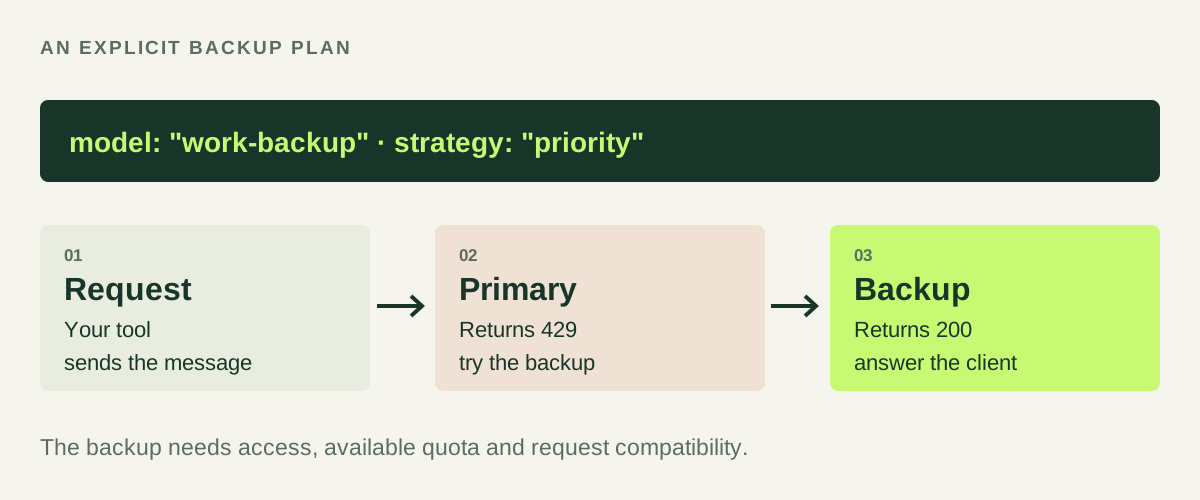
Your tool must request work-backup, exactly as saved. If it still requests a GPT or Claude ID, it is not using this combo. auto creates a separate automatic selection; it is not an alias for your backup plan.
Other possibilities once this path works
Automatic selection: auto, auto/cheap and auto/fast use different criteria across available candidates. Check the connections and their prices before using them.
Distributing requests: other strategies spread load instead of waiting for the primary to fail. That solves a different problem; distributing requests does not expand a shared quota.
Reducing repeated context: caching and compression can reduce work or text sent in suitable cases. Measure the result: compression can remove details and does not guarantee a fixed saving.
Automation: CLI, API and MCP interfaces can manage the gateway. The dashboard is enough for this first path; a long integration list does not replace testing your use case.
Use it from your tool
Create a key for your tool in OmniRoute’s API Keys. This grants access to the gateway; it is different from the provider keys you saved in Providers.
| OpenAI-compatible app setting | Value |
|---|---|
| Base URL | http://localhost:20128/v1 |
| API Key | The key created in OmniRoute |
| Model | work-backup |
To check it without setting up an editor, open another terminal and send this request. Replace the key placeholder and keep the server terminal running.
curl http://localhost:20128/v1/chat/completions \
  -H "Authorization: Bearer YOUR_OMNIROUTE_KEY" \
  -H "Content-Type: application/json" \
  -d '{"model":"work-backup","messages":[{"role":"user","content":"Explain an API in two sentences."}],"stream":false}'
Windows: the same test in PowerShell
$headers = @{ Authorization = "Bearer YOUR_OMNIROUTE_KEY" }
$body = @{
  model = "work-backup"
  messages = @(@{ role = "user"; content = "Explain an API in two sentences." })
  stream = $false
} | ConvertTo-Json -Depth 5
Invoke-RestMethod -Uri "http://localhost:20128/v1/chat/completions" -Method Post -Headers $headers -ContentType "application/json" -Body $body
A successful response contains text at choices[0].message.content. Inspect the logs to identify the model that served it; the wording does not need to match across attempts.
Then configure those three fields in your compatible tool. They are not ChatGPT or Claude web-chat settings. localhost works when the tool and OmniRoute run on the same machine; inside Docker it refers to that container.
What about Claude Code or Codex CLI?
OmniRoute provides launchers for both. Client compatibility still matters: Anthropic does not support routing Claude Code to non-Claude models through gateways. For Claude Code, prepare a combo containing only compatible Claude destinations; its native base URL is http://localhost:20128, without /v1.
For Codex CLI, check that the provider supports the client’s protocol and tools. A successful text answer does not prove every combination works. Launchers and configuration ↗ · Claude Code gateways ↗.
Verify and troubleshoot
Check what matters before relying on it
- The primary and backup both respond individually.
- The request uses
work-backupand logs show the expected destination. - The backup supports the context and tools your application needs.
- You understand the cost and quotas of the alternatives you authorized.
A rehearsal without exhausting your quota: create a second combo, backup-check, with the same steps. Remove the primary only from that copy, then repeat the request with model set to backup-check. Confirm the backup responds. This checks the backup path; it does not itself simulate a 429 error. Keep both steps in work-backup.
With OmniRoute 3.8.50 and two controlled local HTTP services, the primary returned 429. The same combo then called the backup and delivered its response with 200. The content was a test response: this validates the fallback mechanism, not access to a ChatGPT or Claude account.
Request: model = skoa-fallback-lab, strategy = priority
1. primary → HTTP 429
2. backup  → HTTP 200
Client     → HTTP 200, content: BACKUP_OK
If something fails
The primary fails but the model does not change
Check the requested combo name, strategy and step order. Test the backup alone and inspect the logs: it may lack balance, be in cooldown or reject the request. Another attempt cannot solve every error.
The backup fails too
Check for shared quotas, an Internet outage or a request that exceeds both models’ context windows. OmniRoute cannot answer when no valid alternative is available.
I receive 401 or 403
Distinguish the OmniRoute key from the provider key. If rejection happens before reaching the provider, check the former; if it comes from the provider, inspect its connection, permissions and model access.
The dashboard or sign-in does not work
Check Node and that the server is still running. If port 20128 is occupied, add --port 20130 at startup and update the URLs. For Codex OAuth, sign in from the OmniRoute machine and avoid another login occupying callback port 1455.
Press Ctrl+C to stop it. Repeat the startup command to run it again; configuration persists. While OmniRoute is off, tools pointing at it cannot use that gateway.
Quick reference and sources
From “limit reached” to a prepared backup.
Commands, connections, a priority combo and checks in one short reference.
Download quick reference ↓Markdown · no accounts or secrets · OmniRoute 3.8.50What we verified
Startup of npm package 3.8.50 on macOS with Node 22.22.3, the local dashboard, combo creation and actual failover between two simulated services after a 429. We did not connect ChatGPT/Claude accounts or consume their paid APIs during this review. Validate your own connections and client with real models.
Reviewed on 21 September 2026. Illustrations are explanatory diagrams. Models, quotas and connectors can change.
Keep learning
- OmniRoute · GitHub ↗
- OmniRoute · Combos ↗
- OmniRoute · Usage & quotas ↗
- OpenAI · Codex authentication ↗
- Anthropic · Authentication & credentials ↗
- OpenRouter · Model fallbacks ↗
For a practical, beginner-oriented learning resource: midudev · OpenCode course (Spanish) ↗. It covers OpenCode; it is not the technical source for this OmniRoute guide.
Want to connect a chatbot to your data? Continue with Pi and Docker →