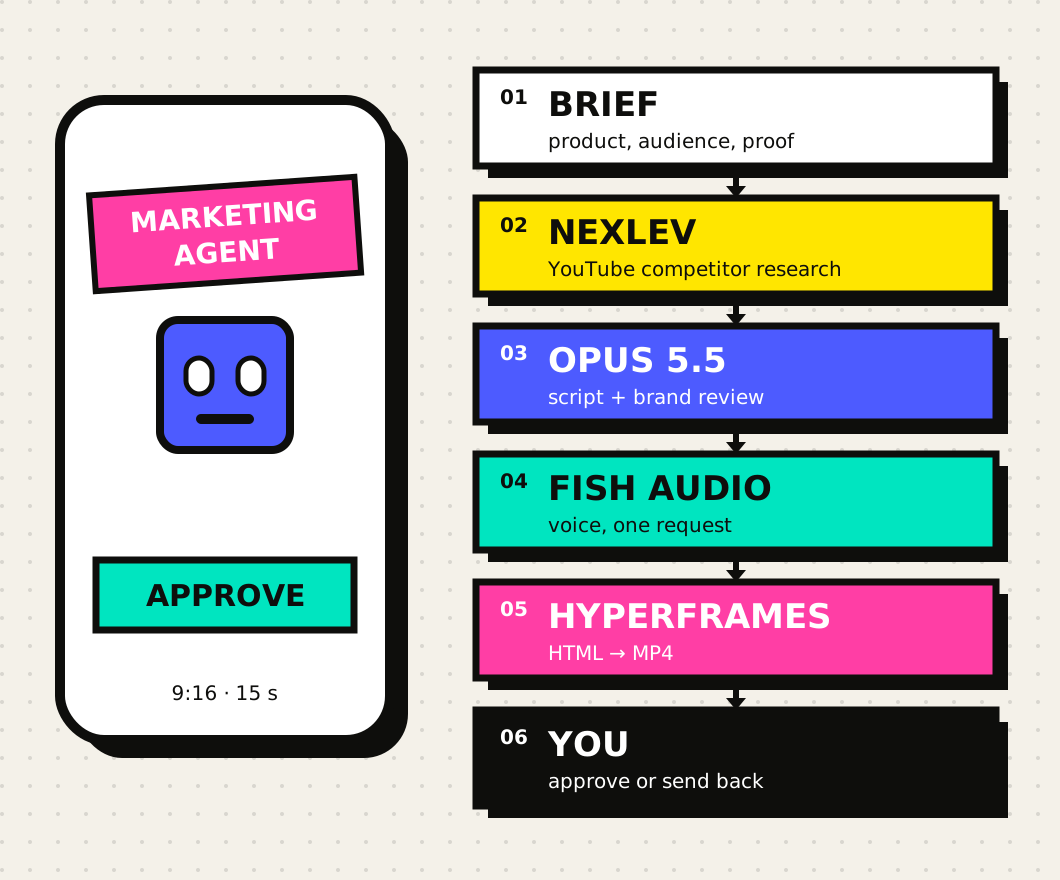
The result: a vertical promo in two languages.
We gave the agent a five-line brief: promote this tutorial to founders and marketers who already use Claude. It returned the script, English and Spanish voice-overs, two HyperFrames compositions and these two videos. No video editor was involved. The only manual step was the review.
The example is small on purpose: six sentences, six scenes. The same procedure works for an ad, a launch or a series of Shorts. Only the brief and the scenes change.
What a marketing agent is (and isn't).
It is not a chat that writes posts. It is a model with tools and a written procedure: it reads a brief, decides what to research, calls each tool, checks the result and stops where you tell it to. In Claude Code that takes three things:
- A model in charge: Opus 5.5 reads, plans, writes the script and the scene code, and reviews the frames.
- Tools: MCP connectors (NexLev), plugins with commands (marketing) and your own scripts (Fish Audio, ffmpeg, HyperFrames).
- A skill: a
SKILL.mdwith the steps, the rules and the points where the agent waits for your approval.
The agent does not publish. It hands over the video and a report; publishing is your job. That way a wrong claim or a mispronounced name never reaches your audience unseen.
The pieces and what each one does.
| Piece | What for | Access | In this run |
|---|---|---|---|
| Claude Code + Opus 5.5 | Orchestrate, write script and scenes, review | Claude plan or API | Used |
marketing plugin | /marketing:competitive-brief, /marketing:brand-review and more | Free, Apache-2.0 | Used for the channel's long video; not in this promo |
| NexLev MCP | Channels and videos that stand out on YouTube | NexLev account, OAuth | Not connected |
| Fish Audio | Voice from text | API key | Used: 2 requests |
| HyperFrames | HTML + GSAP to MP4, deterministic render | npx hyperframes | Used: 0.9.16 |
| ffmpeg | Voice pauses and loudness | Local | Used |
If you already use another research tool, such as Ahrefs or Similarweb, the marketing plugin ships connectors for them. The agent stays the same: only what you connect changes.
Step 1: the project and the model.
A Claude Code agent is a folder. What sits in .claude/ defines how Claude works inside it. Pin the model so every session in this folder runs Opus 5.5:
{
  "model": "claude-opus-5-5"
}
The full kit:
.claude/settings.json                    model
.claude/skills/marketing-agent/SKILL.md  the procedure
brief/brief.md                           what to promote and what can be claimed
script/{es,en}.txt                       one sentence per line
scripts/fish-tts.mjs                     text → MP3 with Fish Audio
scripts/build-video.mjs                  script + cuts → video-<lang>/index.html
scripts/finish.sh                        render + −14 LUFS
video-{es,en}/                           HyperFrames projects
The brief matters most. It has a line people forget: what must not be claimed. Leave it out and a model eager to sell will make up view counts.
- Product: the SKOA tutorial "Build a marketing agent with Claude".
- Audience: founders and marketers who already use Claude.
- Action: read the tutorial at skoa.online/blog/.
- Claims we can prove: the pipeline in this folder and the approval step.
- Do not claim: views, sales or time saved.Step 2: research competitors with NexLev and the marketing plugin.
NexLev publishes a read-only MCP server with public YouTube data. Its guide gives this command for Claude Code:
claude mcp add -s user --transport http nexlev https://prod.dashboard.nexlev.io/api/claude-mcp
# inside claude: /mcp → nexlev → Authenticate (opens the browser)
claude mcp list   # nexlev: … (HTTP) - ✓ Connected
The skill uses search_niche_finder_channels or get_similar_channels to find five channels in the niche, then youtube_channel_outliers to see which of their videos perform far above the channel's average. From those videos the agent keeps three things: the hook, the title and the length.
NexLev was not connected in this run. The command and tool names come from NexLev's official guide, last updated on 20 August 2026. Limits depend on your plan and are counted per tool and per day: on the free plan, for example, you get 10 channel searches and 5 similar-channel lookups. Check your plan before a large research run.
To position yourself against direct competitors, add Anthropic's marketing plugin. It is open source and brings commands such as /marketing:competitive-brief, /marketing:brand-review, /marketing:campaign-plan and /marketing:seo-audit:
/plugin marketplace add anthropics/knowledge-work-plugins
/plugin install marketing@knowledge-work-plugins
The skill requires a link for every fact in brief/research.md. If NexLev fails or runs out of quota, the agent writes that down and continues with the plugin alone. It must never fill the gap with invented numbers.
Step 3: the skill that turns Claude into the agent.
The skill is a procedure, not a long prompt. Claude loads it when you ask for a promo or a launch short. These are the parts that matter most:
---
name: marketing-agent
description: Turns a product brief into a researched short video for
  YouTube Shorts, Reels or TikTok. Studies competitors (NexLev MCP,
  the marketing plugin's competitive-brief), writes the script, voices
  it with Fish Audio and builds it with HyperFrames. Never publishes.
---
Stop at each **Approval** line and wait for a yes.

## 3. Script
Six sentences, about 15 seconds. Sentence 1 is the hook and must
work muted. Every claim comes from brief.md or research.md.
Run /marketing:brand-review on the script.
**Approval:** show the script and the research summary.

## 6. Finish
**Approval:** the user watches both videos with sound.
Publishing is the user's job, not yours.
There are two approvals. The first comes before any voice credits are spent: fixing a script is free, regenerating audio is not. The second comes with the finished video. The agent cannot hear, so you have to listen to it yourself.
Step 4: the script, one idea per sentence.
For a 15-second Short the agent writes six sentences. The first one has to work without sound, because many people watch with the sound off. Each sentence becomes a scene, so each carries a single idea:
A marketing agent put this video together.
First, it studies your competitors with NexLev.
Then Opus 5.5 writes the script.
Fish Audio gives it a voice.
And HyperFrames turns it into video.
But nothing goes live without your OK.
The hook is true here, and that is no accident. The skill requires every claim to come from the brief or the research, and /marketing:brand-review checks the tone before your first approval.
Step 5: voice with Fish Audio, cuts on the pauses.
One request per language, with the key in the environment. The script is twenty lines with no dependencies:
const res = await fetch('https://api.fish.audio/v1/tts', {
  method: 'POST',
  headers: { Authorization: `Bearer ${process.env.FISH_API_KEY}`,
             'Content-Type': 'application/json', model: 's2.1-pro-free' },
  body: JSON.stringify({ text, reference_id: voice, format: 'mp3',
                         mp3_bitrate: 192, normalize: true }),
});node scripts/fish-tts.mjs --text script/en.txt \
--voice 536d3a5e000945adb7038665781a4aca --out video-en/assets/vo.mp3
node scripts/fish-tts.mjs --text script/es.txt \
--voice 3f45a7fd7a614655a61eb7027b955783 --out video-es/assets/vo.mp3We used two public voices from the Fish library: Ethan in English and «voz de locutor k» in Spanish. The reference_id is the id in each voice's URL on fish.audio. Fish does not return word timings, so the scene cuts come from the pauses in the audio:
ffmpeg -i video-en/assets/vo.mp3 -af silencedetect=n=-35dB:d=0.18 -f null -
silence_start: 2.00   silence_end: 2.54   → scene 2 at 2.39
silence_start: 4.85   silence_end: 5.42   → scene 3 at 5.27
silence_start: 7.81   silence_end: 8.30   → scene 4 at 8.15
silence_start: 9.86   silence_end: 10.06  → scene 5 at 9.91
silence_start: 11.85  silence_end: 12.54  → scene 6 at 12.39
Each scene starts 0.15 s before the voice comes back, so the picture lands just ahead of the word. In Spanish one pause is only the comma after «Después,», and the agent has to recognize it and not cut there. The video ends 0.3 s after the last word, with no end card or fade.
Step 6: the video with HyperFrames.
HyperFrames turns HTML into video. The animation is a paused GSAP timeline, and the renderer steps through it frame by frame in headless Chrome. The same HTML always gives the same video, and you can open and tweak it in the preview.
npx hyperframes init video-en --audio vo.mp3 --language en \
  --resolution portrait --non-interactive
# 1080×1920, transcribes the voice with whisper (transcript.json)
# and writes AGENTS.md / CLAUDE.md with the rules for the agent
The agent does not draw the scenes by hand; it writes a generator. build-video.mjs reads the script and the cuts, then writes an index.html with six scenes, captions and the timeline:
const CUTS = {
  // start of scenes 2 to 6, then the end (last word + 0.3 s)
  es: [2.80, 5.62, 8.95, 10.78, 13.15, 15.58],
  en: [2.39, 5.27, 8.15, 9.91, 12.39, 14.79],
};
// each scene is a clip with a start and a duration in seconds
// <div id="s2" class="clip scene" data-start="2.39" data-duration="2.88">
tl.to('#s2 .hot', { scaleY: 1.3, duration: 0.5, ease: 'back.out(1.6)' }, 3.14);
Before rendering, npx hyperframes check lints the composition, runs it and measures readability. On the first version it flagged two labels that were not on screen long enough to read. We brought them in earlier.
line_unread  "por encima de su media" (5 words) is on screen 1.07 s,
             under its 1.50 s floor
line_unread  The film's last line "APROBADO ✓" is on screen 1.02 s
nested_structure_needs_subcomposition  (6×, an organization warning)
The structure warnings suggest moving each scene into its own file under compositions/. For six short scenes we kept one file on purpose, so the example reads at a glance. In a longer project, split them.
Step 7: check frames, measure loudness, approve.
The agent looks at the video before you do, in its own way: it builds a sheet with one frame per scene and reviews it. The first sheet showed two problems. The highlighted bar in the chart covered the search box, and the cursor that presses "Approve" was too small to see on a phone.
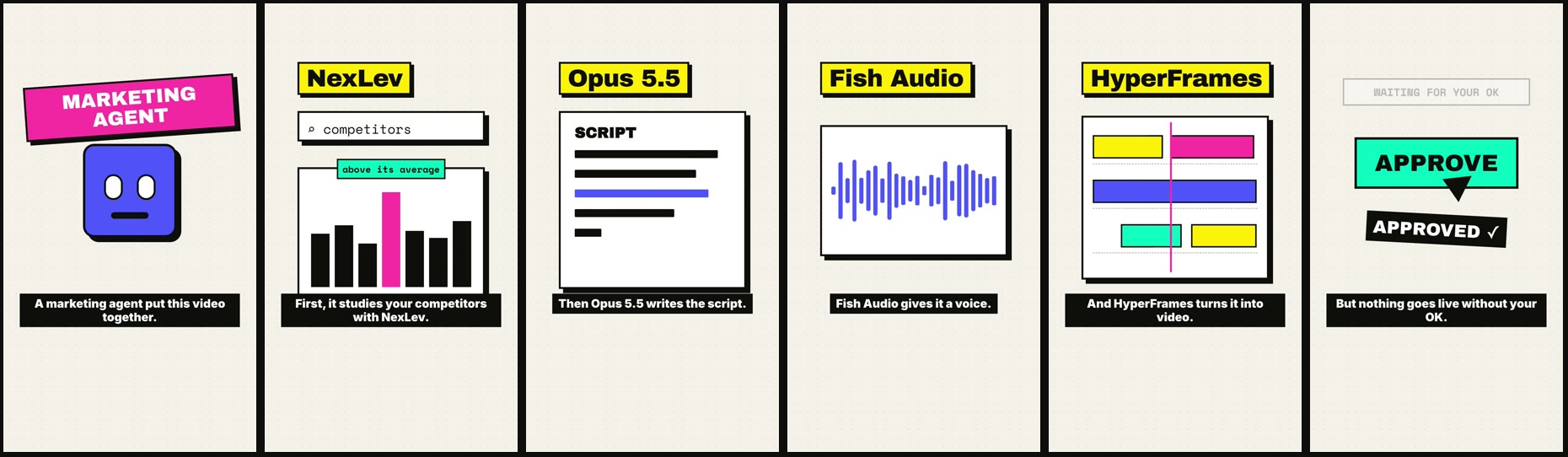
Then it renders and normalizes loudness to −14 LUFS in two passes:
promo-en.mp4  1080×1920  14.8 s   I: −14.3 LUFS   peak: −0.9 dBFS
promo-es.mp4  1080×1920  15.6 s   I: −14.1 LUFS   peak: −1.9 dBFS
Before normalizing, the English voice came out at −23.1 LUFS and the Spanish one at −15.8: two voices from the same tool, 7 dB apart. That is why you always measure and never assume.
The transcription heard "Nextlev" where the voice says NexLev. That is a whisper error, not a Fish one, but it does not prove the name sounds right either. Listen to the proper names before you approve: NexLev, Opus, Fish Audio and HyperFrames.
Costs, limits and where it breaks.
- Fish Audio: two requests, of 228 and 234 characters. The price depends on your plan, so check it in your account. Before you publish, also read the terms for commercial use of public library voices: we are still checking them ourselves.
- NexLev: daily limits per tool and per plan. Its site gives different figures for the number of tools and for API quotas on different pages, so trust what your dashboard shows.
- HyperFrames: rendering is local and costs no credits. On an M4 Pro Mac each 15-second video rendered in under a minute. The first run downloads headless Chrome and the fonts.
- Opus 5.5: this is where most tokens go, because it writes code and reviews images. With a Claude Code subscription it counts against your usage limits.
- Where it breaks: word timings that are not exact, mispronounced names and overlapping labels. All of these show up in review, and none of them reaches your audience if you keep the final approval.
The kit and the prompt to do it yourself.
The whole agent, in one folder.
Skill, sample brief, scripts, Fish and finishing scripts, and both HyperFrames projects with their voice.
Download the kit ↓ZIP · 760 KB · no keys or secrets · HyperFrames 0.9.16Unzip it, export your Fish key and open Claude Code in the folder. Then ask:
Use the marketing-agent skill with brief/brief.md.
Research 5 channels in the niche with NexLev and summarize in
brief/research.md what their standout videos have in common, with links.
Write a 6-sentence script in English and Spanish and show it to me
before generating the voice. Fish voices: <EN id> and <ES id>.
Build the videos with HyperFrames, review a frame sheet,
normalize to −14 LUFS and tell me what you could not verify.
Do not publish anything.
No NexLev? Drop the second line; the skill still works with the marketing plugin alone. If you want the motion-graphics side, From chat to video shows how to sync animation word by word. More tutorials on the SKOA blog.